Click Connect Discord, authorize the sign-in, then choose Create character and enter your in-game name. One Discord account can hold several characters, such as Warden and Oldngray.
Use the Active character selector above the page before importing or editing. Each character has its own collected cards, duplicates, and public trading profile. Your existing Discord collection goes to the first character you create; additional characters start empty.
02
Take screenshots of the Bounty Encyclopedia
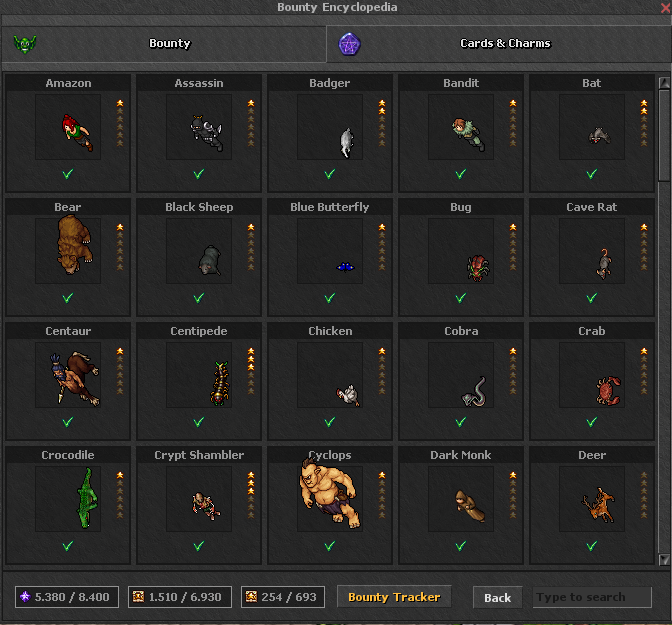
Open the monster grid in Elderan’s Bounty Encyclopedia. Keep monster names and the star columns readable. Scroll and take more screenshots to cover the collection; overlapping entries are fine.
Example: 5 columns × 4 rows The gold outline marks the grid to select, including names and stars. Leave the top tabs and bottom toolbar outside your selection. View full-size screenshot ↗
Choose Import screenshots and add PNG, JPEG, or WebP files. You can choose up to 10 images, each under 15 MB. Images are read on your device and are not uploaded.
03
Line up the grid and scan
Drag a rectangle around the complete monster grid. Set Columns and Rows so the gold lines follow the tile borders. The example above uses 5 columns and 4 rows.
Click Scan selected grid. For several files, choose each image in the Image selector, adjust its grid, and scan it. The review list accumulates entries until you apply or clear them.
04
Review the exact cards you own
Check the detected name and tick every owned card: Common contributes 1 star, Rare contributes 2 stars, and Special Rare contributes 3 stars. A monster is complete at 6 stars.
Three stars can mean two different things. For Centipede in this example, tick Common and Rare if you own the 1-star and 2-star cards. Tick only Special Rare if you own the 3-star card instead. The screenshot total cannot distinguish them, so you must confirm.
The checkbox at the left includes or skips the entire entry. Click Apply checked entries when you’re happy. Imports combine confirmed cards with the active character’s collection and leave duplicate counts unchanged. You can untick a collected card manually to correct a mistake.
05
Add duplicates and keep the collection current
Click a monster to open its card details. Tick or untick Common, Rare, and Special Rare independently. Under Duplicates available for trade, enter how many spare cards of each rarity you still have.
The encyclopedia shows collected cards, not spare cards. Duplicate quantities are entered separately. Wait for Saved to [character] before leaving or switching. Export a backup any time; the file is labelled with the active character.
06
Publish a character and find a trading partner
Select the character you want to trade with, then open Trading post. Turn on Make this character’s collection & duplicates public to list that character. Other characters stay private unless you publish them too.
Trade matches compare specific missing card rarities with available duplicates. A Mutual match means you both have something the other needs. Open the collector’s Discord profile and arrange the trade in-game, then update your duplicates manually.
You can also compare a friend’s exported collection file without publishing a profile. Unpublish a character at any time to remove its public listing.
A few useful answers
Can I try it without Discord?
Yes. Guest collections stay in this browser and support imports, manual edits, backups, and file comparisons. Connect Discord and create a character for account-based saves and public trading profiles. You can choose to merge your guest collection into the selected character.
Does creating a character log into my Elderan account?
No. A character here is a named collection under your Discord account. You don’t enter an Elderan password, and the site does not verify in-game ownership or carry out trades.
What happens to my existing collection?
Your previous Discord collection is preserved and assigned to the first character you create. New characters start empty. Guest data remains separate until you explicitly choose to merge it.
What if saving fails?
Keep the page open and export a backup. A failed save blocks character switching so unsaved edits don’t end up on another character. If another tab changed the collection, export your edits before reloading.